A. Mobile App Recommendation
We highly recommend that all users download the FC Field App when conducting visits or completing self-visits. The mobile app optimizes platform functionality, and the data you enter will be synchronized. This allows you to add comments later on your laptop by accessing FC through your browser. You can log in to the app using your FC Login ID and Password. The Company Code is: maplebear.
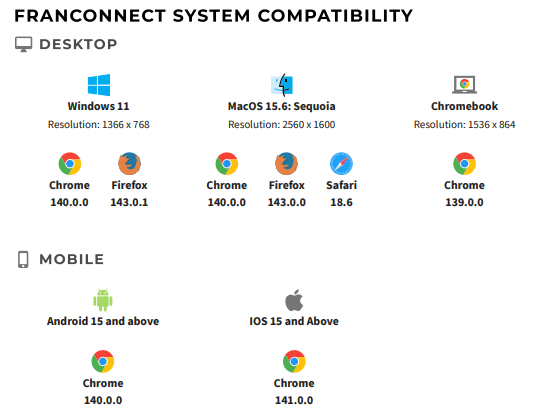
B. Browser Access
If you access FC via a browser, please note the compatibility requirements. Chrome and Firefox are the recommended browsers.
The FC site URL is:
https://maplebear.franconnect.net/fc (without “www”).
C. Avoid Multiple Tabs for the Same Visit
Please do not work on the same visit in two different tabs, as this will cause the system to overwrite the data entered in each tab. As a result, none of the data will be saved completely. Always open one visit in one tab from start to finish.
D. New and Improved Pop-up Experience
The explanations for pop-up windows associated with Smart Questions have been updated. To make this simpler, FC has revised the wording on the pop-ups. The actions remain the same, but the button labels now clearly describe what each option does.
We are also working with FC to disable all Smart Questions features—more information coming soon.
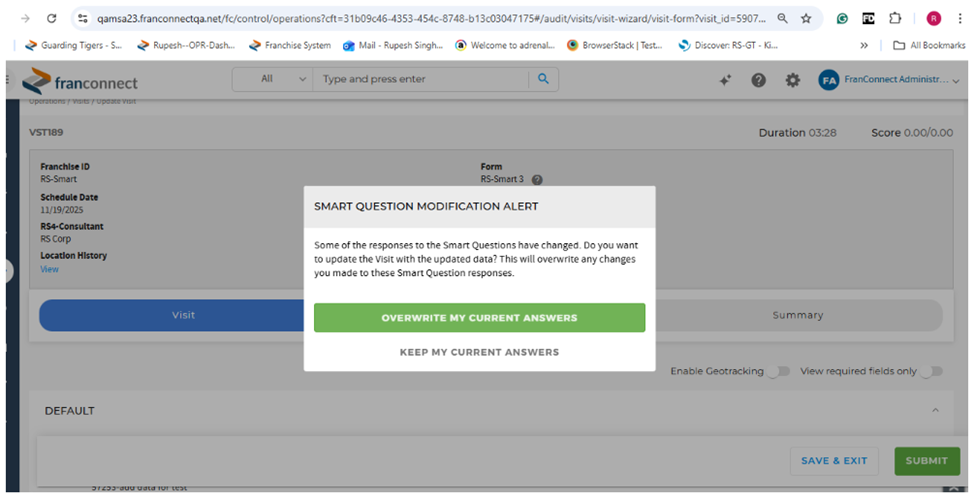
New Button Labels:
- Use updated value
Choosing this option replaces the answer you entered in the visit with the updated value from the location details in the Info Manager module.
- Keep my current answer (Recommended)
Choosing this option keeps the answer you already entered for the visit.
E. Server Downtime Schedule
FC has revised the server downtime schedule to:
Friday 11:00 PM – Saturday 1:00 AM EST
This will not impact regular school visits worldwide.
Was this article helpful?
That’s Great!
Thank you for your feedback
Sorry! We couldn't be helpful
Thank you for your feedback
Feedback sent
We appreciate your effort and will try to fix the article